Accessories · Mixed construction
Crochet iPhone 18 Pro Case: Fit & Construction Guide
By Looplader · Project guide · Updated
- Skill
- Intermediate
- Hook
- Choose from a fabric-density swatch
- Yarn
- Smooth cotton or cotton blend; validate with your own swatch
- Time
- Prototype in separate sittings: swatch and measurements first, then the sleeve, finishing and real-device checks.
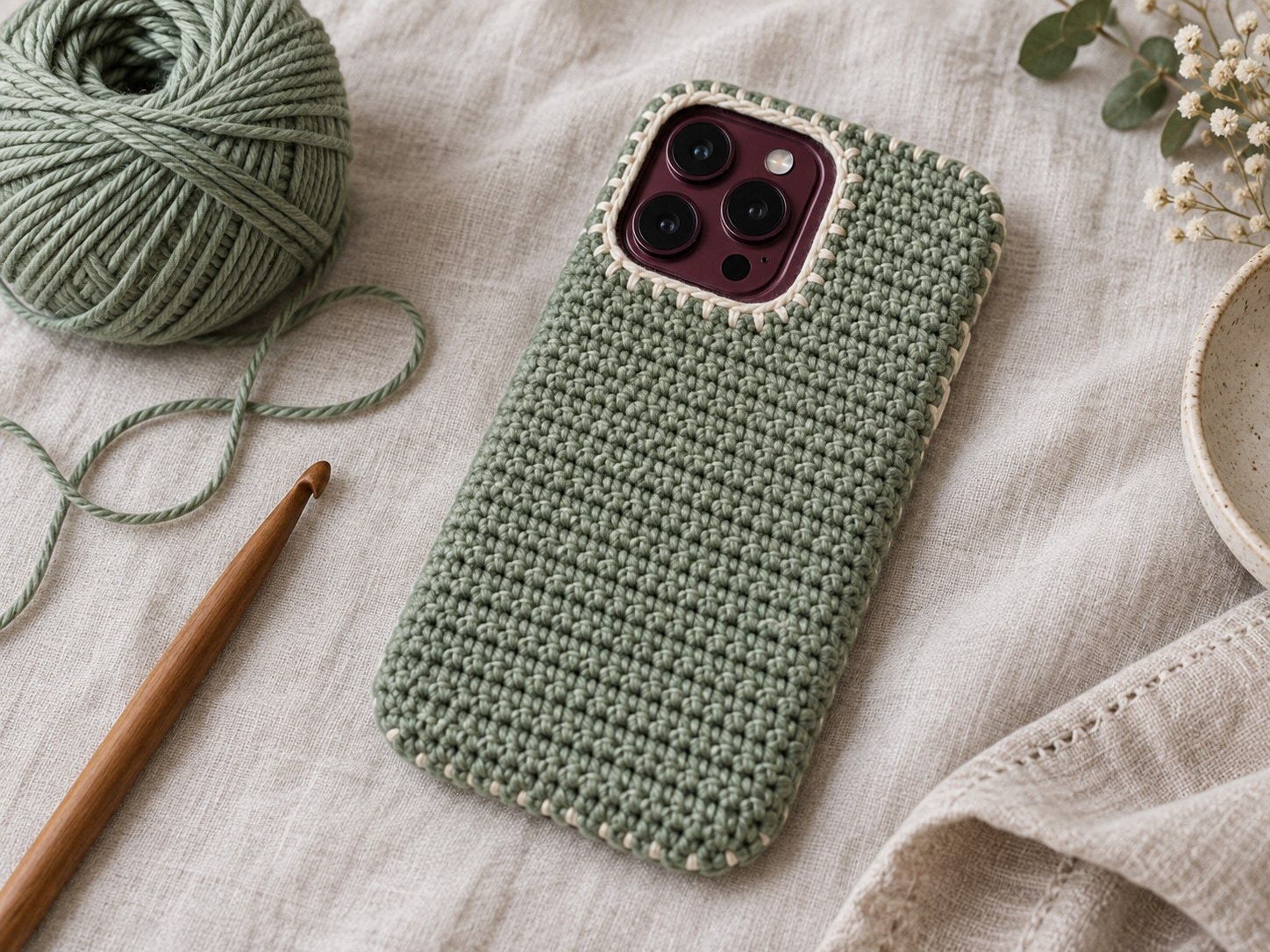
A crochet iPhone 18 Pro case needs to be designed as a fitted sleeve: establish your gauge first, then check body allowance, camera clearance, side-control access and charging clearance against the real phone. This detailed guide uses Apple’s published 150.0 × 71.9 × 8.75 mm iPhone 18 Pro dimensions as the starting reference for planning the fit.
Use this guide to prototype your own original case on your own device. It explains the decisions that matter before you write or rely on round counts, including how to swatch, plan openings, add a lining and inspect fit. The illustrations show the intended construction stages; they are not evidence of a completed physical device test.
Pattern, Pinterest & resources
- Apple: iPhone 18 Pro technical specifications
Primary source for the iPhone 18 Pro’s listed width, height, depth, display, controls, camera system and connector.
- Apple: iPhone 18 Pro overview
Official overview and current device imagery; no Apple imagery is reused in this guide.
- Craft Yarn Council: yarn weight system
General yarn-category and gauge reference; it does not establish a phone-case gauge.
- Craft Yarn Council: crochet abbreviations
Reference for US crochet terminology.
What this project includes
- Starts with the real iPhone 18 Pro body dimensions rather than copying a generic phone pouch measurement.
- Separates the fit checks for the camera, Action button, Camera Control, side button and USB-C opening.
- Uses a gauge formula so your own yarn and hook determine the stitch plan.
- Explains when a soft sleeve is appropriate and why a crochet layer is not drop protection.
Detailed project guide
- 1
Start with the phone, not a generic pouch
Apple lists the iPhone 18 Pro at 150.0 mm high, 71.9 mm wide and 8.75 mm deep. Treat those three values as the body reference only: a crochet layer has thickness, and you need a small amount of functional ease to slide the phone in without stretching the fabric. Measure your own device too, especially if a screen protector, camera protector or existing thin case will remain on it.
A crochet sleeve is not a rigid protective shell. Its useful jobs are surface protection, a handmade texture and a softer carrying layer. It cannot make drop-protection, water-resistance or camera-protection claims. Decide at the start whether you want a removable sleeve, a back-only cover, or a case with openings; each one needs different checks.
- 2
Make a relaxed gauge swatch before choosing stitch counts
Work a square swatch in the stitch you intend to use for the body. Let it rest flat, then measure a central section without pulling it. Record stitches per 10 cm and rows per 10 cm. Convert the device width and height into a preliminary stitch and row count using your own measured fabric, then add your chosen ease in millimetres before rounding.
A firm stitch fabric can still be flexible. If your phone outline prints through open holes, reduce hook size or choose a denser stitch. If the fabric is so stiff that a seam bows, reassess hook and tension. Do not borrow another maker’s count: different cotton, hook and tension can change a fitted case substantially.
- 3
Choose a construction that keeps the dimensions controllable
A joined-row rectangle folded and seamed gives you separate front and back panels, which makes a camera opening and control placement easier to plan. A tube worked in the round removes side seams but requires more careful placement for openings. For either route, make a paper template first: trace the phone body, mark the camera module, side controls and USB-C area, then compare it to your swatch math.
Keep the top open until the fit is confirmed. Crochet grows and relaxes differently after handling, so a flat panel that matches the paper template can behave differently once it is folded. Place removable markers at the planned side and camera landmarks before cutting chains or skipping stitches.
- 4
Build a body that is intentionally a little smaller than the flat measurement
Cotton crochet has give under light pressure. Build the sleeve body with a controlled negative ease only after your swatch proves it can stretch smoothly without showing the phone beneath. The safe check is practical: the phone should enter with a gentle slide, sit without a loose baggy corner, and come out without pulling hard on the edging.
Keep the seam allowance and edge treatment separate from the main body calculation. A decorative border can add width or pull an edge inward. Before adding it, compare the unfinished body to the phone on every side. If the back panel needs a camera opening, finish the main fabric to that placement point first instead of trying to cut a hole into completed crochet later.
- 5
Plan camera clearance as an opening, not a decorative window
The iPhone 18 Pro has a 48MP Pro Fusion camera system, so an open-back design needs enough clear space for the entire camera area and its surrounding features. Mark the camera zone from your real device with removable markers, then work the opening into the panel using a planned chain space or a separately constructed back panel. Reinforce the edge with a tidy round of slip stitches or single crochet after the shape has been checked.
Do not position the opening from a rendering alone. Put the unfinished panel over the actual device and confirm there is no yarn touching the lenses, flash, microphone or nearby sensors. A soft sleeve can instead cover the camera when the phone is stored; that route avoids an opening but should not be used while taking pictures.
- 6
Check every side control before finishing openings
Apple lists volume controls, an Action button, Camera Control, side button and USB-C connector on the iPhone 18 Pro. For a sleeve, the cleanest solution is usually a removable design that leaves the sides unstructured. For a fitted cover, mark each control on the real phone while it is inside the unfinished case, then decide whether the feature needs an opening or only a flexible stitch area.
Avoid making a long slit simply because the button location is uncertain. A poorly supported slit can stretch, curl or catch. Make a small reinforced opening only where the physical device check demonstrates a need, and test every button while the case is on. Recheck after the border is added; edging can shift the fit.
- 7
Add a lining only after the crochet fit is correct
A thin cotton lining can reduce snagging and give the interior a smoother feel. Cut it smaller than the flat crochet outline only after the empty sleeve fits the phone as intended; an oversized lining can create folds, while an undersized lining can pull the crochet out of shape. Fold and finish the lining edge, baste it lightly, and keep it below the top edge and away from all functional openings.
Hand stitch through the inside edge rather than pulling thread across the outer crochet surface. Check that the lining does not obscure the camera opening, side controls or USB-C area. If your crochet is meant to be a washable sleeve, choose lining and thread with compatible care requirements and test a small sample first.
- 8
Finish with a real-device checklist
Place the actual iPhone 18 Pro into the completed sleeve and check the top, corners, camera clearance, every side control and USB-C access in the way you will truly use it. Remove and replace the phone several times. Look for stretching around any opening, a seam that rubs a corner, yarn that rides over a lens, or a lining that catches. Photograph and measure the finished physical sample if you plan to turn the prototype into a sellable pattern.
This is the point where notes matter. Record yarn, hook, relaxed gauge, finished flat and worn measurements, ease, and any changes to the camera or control plan. Only after repeated physical checks should a device-specific crochet pattern claim compatibility with iPhone 18 Pro.
- 9
Care and safety
Use the care instructions for your actual yarn, lining and thread. Remove the phone before cleaning or wetting the sleeve, allow the textile to dry completely, and keep it away from heat sources. A handmade crochet layer does not replace a protective case, screen protection or safe handling. Apple and iPhone are trademarks of Apple Inc.; this independent guide is not affiliated with or endorsed by Apple.
Tips for success
- Use a paper outline plus your real device for landmark placement; marketing images cannot verify case openings.
- Keep the first prototype plain. Add tassels, motifs or a closure only after camera and control fit are proven.
- Use locking markers for camera and control locations; never cut an opening into a finished case without a planned reinforced edge.
- Record device version, yarn, hook, gauge and final measurements for every fit-tested prototype.
Pattern at a glance
- Time to make
- Prototype in separate sittings: swatch and measurements first, then the sleeve, finishing and real-device checks.
- Skill level
- Intermediate
- Hook
- Choose from a fabric-density swatch
- Yarn weight
- Smooth cotton or cotton blend; validate with your own swatchCYC standard
- Yardage
- Varies with sleeve dimensions, yarn and gauge; record usage as you work.
- Gauge
- Measure your own relaxed swatch; convert millimetres to stitches and rows before making the sleeve.
- Finished size
- Device-specific; based on iPhone 18 Pro’s published 150.0 × 71.9 × 8.75 mm body plus your chosen ease.
Free ebook
Get new patterns, and the ebook
New patterns as they land, plus our free beginner's crochet stitch guide. No daily blasts, unsubscribe in one click.
Frequently Asked Questions
Will this crochet case fit an iPhone 18 Pro?
This guide is a sizing and construction resource. Your yarn, gauge, lining and device accessories determine the finished fit. Make a swatch and check the sleeve on your actual iPhone 18 Pro, including camera, control and charging clearance.
Can I use this as drop protection?
No. Crochet fabric is a soft textile layer, not certified impact protection. It may reduce surface scuffs while carrying the phone, but it cannot guarantee protection from drops, crushes, moisture or damage to the camera. Use appropriate protective hardware for those risks.
Do I need a camera opening?
Only if you want to use the phone’s camera while it remains in the crochet case. A removable sleeve can cover the camera during storage and avoids the most difficult shaping step. For an open-back cover, establish clearance directly on your own device and reinforce the opening.
Why not use a generic phone pouch pattern?
A generic pouch may hold the device, but it does not establish camera, button, Camera Control or connector clearance. The iPhone 18 Pro’s published dimensions are a useful start, yet a crochet pattern still requires a gauge calculation and repeated real-device checks before it can claim a fit.